Primary Device
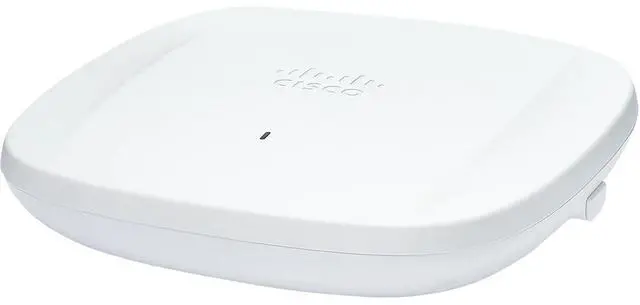
Cisco Cisco Wireless 9178I (CW9178I)
★ 3.4 Value Score
Technical Specifications
- Wi-Fi Standard: Wi-Fi 7 (802.11be, also supports 802.11ax/ac/a/b/g/n); tri-band 2.4/5/6 GHz; 6 GHz up to 320 MHz channels
- Spatial Streams (MIMO): 4x4:4SS per client-serving radio; 12 SS total in default tri-radio mode, 16 SS total in quad-radio mode
- Aggregate Throughput: Up to 24 Gbps aggregate PHY rate (reseller figure; not stated in Cisco's datasheet, and not measured throughput)
- Radios (bands): Default tri-radio: 2.4 GHz (20 MHz), 5 GHz (20/40/80/160 MHz), 6 GHz (20/40/80/160/320 MHz). Quad-radio mode adds a second 5 GHz radio (20/40/80/160 MHz). Plus a dedicated scanning radio and a dedicated 2.4 GHz IoT radio
- Uplink Port Speed: Two 10 Gig mGig ports (mGig0, mGig1) plus console; 10 Gbps needs CAT6 (up to 50 m) or CAT6a (up to 100 m); LAG caps aggregate at 10 Gbps
- Max Clients: 1,200 total (400 per radio); 16 SSIDs per band
- PoE Requirement: 802.3bt (PoE++, Class 6) for full performance with both 10G ports and 16 SS; 802.3at reduces radios to 8 SS (quad-radio uses 2.5G ports, tri-radio uses 1G); 802.3af runs a single 1G port with most radios disabled and no MLO. Power budget in watts not stated
- Antenna: Integrated omnidirectional; 4 dBi (2.4 GHz), 5 dBi (5 GHz), 6 dBi (6 GHz); built-in GPS/GNSS with external antenna option
- Dimensions / Weight: 9.9 x 9.9 x 2.0 in; 4.1 lb (1.87 kg)
- Operating Temperature: 0 to 50 C (32 to 122 F)
- Pricing Notes: No official Cisco list price found; resellers cite MSRP $3,009.98; observed street prices roughly $1,300 to $2,360 (RTG and CFG SKUs differ)
Curation Review
- ✔ Pros: Wi-Fi 7 tri-band (2.4/5/6 GHz) with 320 MHz channels on 6 GHz; 4x4 per serving radio gives up to 16 spatial streams in quad-radio mode; Dedicated scanning and IoT radios for security and BLE/IoT workloads; Dual 10G mGig uplinks for high-throughput backhaul; High client capacity (1,200 clients, 400 per radio); Built-in GNSS for location services; Optional quad-radio mode adds a second 5 GHz radio for capacity
- ✘ Cons: Full performance requires 802.3bt (Class 6) PoE, which many switches don't provide; 802.3at or 802.3af significantly reduce radio and port capability; Premium price compared with typical Wi-Fi 6/6E APs; Official datasheet does not state a PoE wattage budget or aggregate throughput; Pricing and SKU variants (RTG vs CFG) vary widely across resellers; Cisco's own deployment guide has a typo ('803.2bt') in the PoE section, so verify requirements before purchase
- Est. Price: $1,442 - $2,360
Compare Against

Cisco Catalyst 9166 Series (CW9166)
★ 4.2 Value Score
Technical Specifications
- Wi-Fi Standard: 802.11ax (Wi-Fi 6E, 6 GHz capable); also 802.11a/b/g/n/ac backward compatible
- Spatial Streams (MIMO): 4x4:4 on each of the three client radios (2.4 GHz, 5 GHz, 6 GHz); MU-MIMO and OFDMA supported
- Aggregate Throughput: Up to 7.78 Gbps tri-radio aggregate (maximum over-the-air PHY/chipset frame rate, not per-client throughput)
- Radios (bands): Tri-radio 4x4:4: 2.4 GHz client radio, 5 GHz client radio, 6 GHz client radio; plus tri-band scanning radio (2.4/5/6 GHz) for security/RF analytics and a 2.4 GHz Bluetooth Low Energy radio
- Uplink Port Speed: 1x multigigabit RJ45 (100 Mbps / 1 Gbps / 2.5 Gbps / 5 Gbps BASE-T); also 1 USB 2.0 Type-A port
- Max Clients: Not published in the sources reviewed
- PoE Requirement: 802.3bt (UPOE) 30.5 W for full functionality including USB; 802.3at (PoE+) 25 W supported with reduced functionality and no USB; 802.3af not supported; 54 V DC option available
- Form Factor: Indoor ceiling/wall-mount access point; omnidirectional (CW9166I) or directional (CW9166D1) antenna variants
- Dimensions: 241.3 x 241.3 x 56.9 mm (CW9166I) / 57.9 mm height (CW9166D1); approx. 1.6 kg
- Management: Catalyst 9800 wireless controllers (IOS-XE) or Meraki cloud (CW9166I-MR / CW9166D1-MR SKUs)
Curation Review
- ✔ Pros: Tri-band Wi-Fi 6E with 4x4:4 on every client radio for high-density capacity; dedicated tri-band scanning radio for WIPS, spectrum analysis, and location analytics; multigigabit 5 Gbps uplink on a single RJ45 port; Bluetooth Low Energy radio for beacons and asset tracking; supports both Catalyst 9800 controller and Meraki cloud management; full functionality on 802.3bt PoE with USB output
- ✘ Cons: Full feature set requires 802.3bt (UPOE) power, and 802.3at operation reduces functionality; only one uplink port, so no link aggregation or redundancy; premium price compared with many Wi-Fi 6E APs; maximum client count is not published in available sources; Catalyst (CW9166I-B/-E) and Meraki (CW9166I-MR) SKUs are the same hardware under different management licences, which can confuse purchasing; end-of-sale/end-of-life status is unconfirmed and should be checked with Cisco
- Est. Price: $1,136 - $3,317
Popular Comparisons
Cisco Cisco Wireless 9178I (CW9178I) vs Ubiquiti UniFi U7 Pro
Cisco Cisco Wireless 9178I (CW9178I) vs Ubiquiti U6 Pro
Cisco Cisco Wireless 9178I (CW9178I) vs Cisco Catalyst 9178i
Cisco Cisco Wireless 9178I (CW9178I) vs Cisco Catalyst 9176I (CW9176I)
Cisco Cisco Wireless 9178I (CW9178I) vs Cisco Catalyst 9166 Series (CW9166)